The Ultimate Guide to Managing Your Anti-Gravity IDE Quota
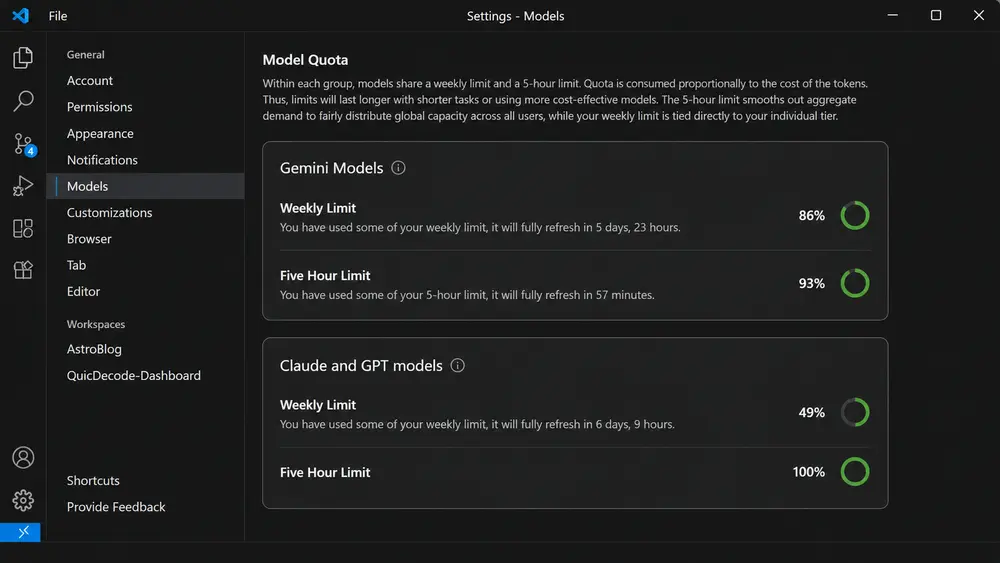
You’ve just upgraded to the premium tier of Google Anti-Gravity IDE (or a similar agent-first environment), and the power of multi-agent AI is finally at your fingertips. But after a few days of regular coding, you notice a frustrating roadblock: your “Weekly Limit” is depleting much faster than expected.
How does this happen so fast? You still have plenty of your daily 5-hour quota left! If you are a new subscriber navigating these complex, dual-layered quota systems, you aren’t alone. This comprehensive guide will decode exactly how AI subscription quotas work, why they drain quickly, and share actionable strategies to keep your AI assistant running smoothly all week long.
My Experience: Navigating Limits Across Different Tech Stacks
As a developer who regularly works equally on both Astro frameworks for the web and native Android applications, I’ve experienced firsthand how these IDE quotas behave in the real world. Moving between web-based Astro components and complex Android app environments requires the AI to process very different types of code and context.
During my regular development routines, I noticed a clear pattern. When I focused too much on the 5-hour limit—sending heavy prompts just to utilize the available percentage on the dashboard—my weekly limits started draining noticeably faster than they should have. It wasn’t a sudden or catastrophic event, but rather a practical realization: treating the AI as an unlimited tool across heavy tech stacks is simply inefficient. This experience completely changed how I approach my daily coding sessions, teaching me to pace my requests strategically.
Also Read: Unveiling the Next Wave: Hidden Powerful Generative AI Models
1. The Trap: Understanding the “5-Hour” vs. “Weekly” Limits
The biggest mistake new developers make is misunderstanding how the dual-limit system operates. They look at their dashboard, see their 5-hour limit at 96% remaining, and start unnecessarily prompting the AI just so they don’t “lose” that quota before the timer resets. To understand why this is a bad idea, we need to understand Compute Effort.
Unlike traditional AI chats that charge you per word (token), agent-first IDEs charge you based on Compute Effort. When you ask the IDE to do something, it spawns multiple background agents to read your files, plan the code, write it, and verify it. This burns through your limits exponentially faster.
The Car Analogy: Speed Limit vs. Fuel Tank Think of your subscription quotas like a car journey:
- The 5-Hour Limit is your Speed Limit: It prevents you from pushing the server engine too hard at one specific moment. If you don’t hit the speed limit, you don’t “lose” anything—you just drove safely.
- The Weekly Limit is your Fuel Tank: This is your absolute hard cap for the week. Every single prompt drains this tank.
2. Common Mistakes People Make That Drain Quotas
Before diving into the solutions, it helps to identify the everyday habits that are secretly eating up your limits:
- The “Keep Everything Open” Habit: Leaving 15 different routing, state management, and styling files open in your editor when asking a question. The AI reads all active tabs to gather context, burning massive amounts of tokens unnecessarily.
- Using a Sledgehammer for a Nail: Defaulting to the heaviest, most excellent models with high thinking (like Gemini 3.1 Pro or Claude Opus 4.6 ) for trivial tasks like fixing a missing semicolon, writing simple regex, or generating basic HTML boilerplate.
- Vague, Sweeping Prompts: Asking the AI to “Fix my app” or “Optimize my website” instead of targeting specific files. Broad prompts force the IDE to spawn too many agents and hallucinate solutions across your entire codebase.
- The “Rollover” Myth: Believing that unused 5-hour quota carries over to the next window. When developers realize it doesn’t, they spend it on useless prompts, draining their actual weekly limits in the process.
3. Actionable Strategies for Smart Quota Management
A. Stop Chasing the Reset Clock
Explanation: The 5-hour quota operates on a strict “use it or lose it” principle. If the timer resets and you haven’t used your quota, the remaining percentage does not roll over to the next window. And that is a good thing! Let it reset. Using the AI unnecessarily to consume a temporary limit directly cannibalizes your highly valuable weekly quota.
B. Reserve Heavy Models for “Heavy Lifting”
Explanation: Agent-first IDEs consume massive compute effort when dealing with cross-file architecture. Save your premium model limits for major engineering hurdles. Do not blow your premium quota on centering a div or simple text formatting. Reserve it for complex architecture like building custom data synchronization workflows or generating secure backend API endpoints.
C. Master the Art of Model Switching
Explanation: Your subscription gives you access to multiple model tiers. By manually toggling between these models based on the task’s complexity, you can stretch your weekly limit significantly. If you are formatting JSON or fixing a simple typo, switch your IDE to a lighter, faster model (like Gemini Flash or GPT-4o-mini). They consume only a tiny fraction of your limits.
D. Isolate Your Context Window
Explanation: Context window bloat is a silent quota killer. If you are debugging a specific function, close everything except the exact file you are working on. Highlight the specific block of code and ask, “Find the logic error in this highlighted function.” Fewer tokens processed means less quota consumed per request.
E. Micro-Tasking for Web Optimization
Explanation: If your goal is to build a highly optimized, search-friendly platform, tackle it component by component. Ask it to generate specific Schema markup for one article type today, and optimize your image loading scripts tomorrow. Breaking large tasks into micro-tasks is much safer and preserves your limits while delivering higher-quality code.
Also Read: Unveiling the Next Wave: Hidden Powerful Generative AI Models
Conclusion
Your AI IDE subscription is a powerful development partner, not a resource to be hastily spent just because a timer is ticking down. Treating your 5-hour limit as a pacing mechanism—while aggressively protecting your weekly limit for complex, multi-file tasks—is the ultimate secret to productivity. Manage it wisely, and you’ll never find yourself locked out of your AI assistant when you need it most.